VR Arena Equipment and Setup Guide for Entertainment Centers
VR Arena equipment and setup for entertainment centers should be planned around visitor flow. The goal is not to fill a room with headsets. The goal is to create a repeatable attraction that visitors understand quickly, staff can operate calmly, and the venue can promote again after launch week.
For 2026 entertainment centers, this is especially important. Customers are used to arcades, cinemas, escape rooms, indoor sports, and short-form digital entertainment. A VR arena has to earn attention. MiXR’s VR Arena and VR Large Space solution should be set up as a commercial venue system: equipment, mapped room, content, queue, staff workflow, cleaning, and support.
Start With the Site
The site should be measured before equipment is selected. Usable area, ceiling height, columns, lighting, ventilation, power, internet, exits, sound conditions, and storefront visibility all matter. A perfect game in a poor room will still feel uncomfortable.
Entertainment centers also need to think about neighboring tenants and visitor circulation. A loud waiting group can help visibility, but it can also create complaints. A queue that blocks a corridor can hurt the venue even when the arena is popular.
Equipment Needed for a Working Arena
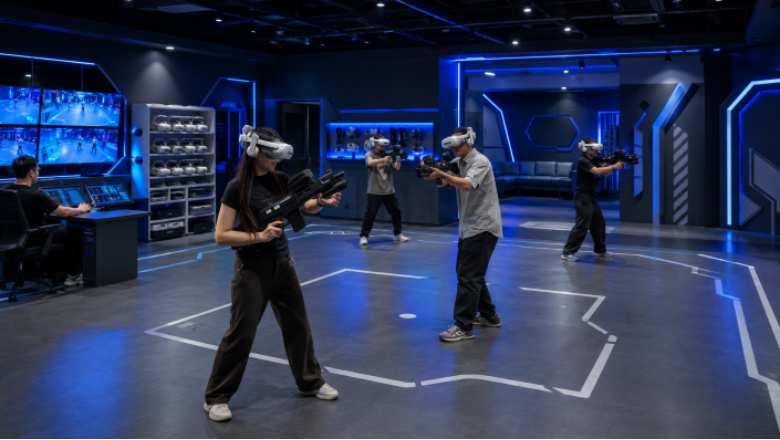
The core equipment usually includes VR headsets, controllers or props, tracking system, computing, local network, operator display, charging racks, cleaning supplies, content software, and spare parts. For VR shooting arena or battlefield formats, tracked weapon-shaped props may be part of the package.
The room equipment matters too: flooring, boundary protection, lighting control, signage, waiting area, staff counter, ventilation, and storage. Treat these as part of setup, not decoration.
Setup Should Protect Reset Time
Reset time is where many entertainment centers lose capacity. If staff have to walk across the room for cleaning supplies, search for charged devices, or explain the same confusing rule to every group, the session cycle stretches. That means fewer paid sessions per day.
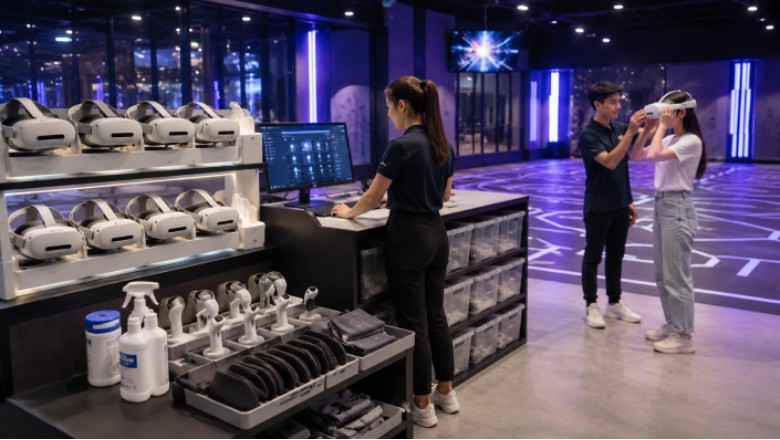
A good setup keeps equipment movement simple: storage to player, player to cleaning, cleaning to charging, charging back to ready use. This flow is not glamorous, but staff will feel it every hour.
Setup Checklist for Operators
- Place the arena where visitors can see the activity without blocking circulation.
- Keep the waiting area close to the briefing point.
- Put cleaning, charging, and storage near the staff station.
- Make sure staff can see the active player zone.
- Test lighting, reflections, and network stability before launch.
- Create a daily opening and closing checklist for equipment and software.
Content Setup Matters
Content should match the entertainment center’s audience. Teenagers may prefer shooting, battle, and score competition. Families may prefer adventure, exploration, or lighter team missions. Corporate groups may care more about booking reliability and team energy.
The venue should label sessions clearly. If guests do not know whether the experience is intense, family-friendly, competitive, or cooperative, staff will waste time explaining. Clear labels also reduce refunds and bad reviews from mismatched expectations.
Staff Training Is Part of Setup
Staff should know how to start the system, brief players, fit headsets, clean devices, manage props, pause a session, report faults, and close the arena. Do not rely on one technical employee. Entertainment centers often have staff turnover, so the process has to be learnable.
MiXR should be asked for training materials, maintenance guidance, and support procedures before opening. The best setup is one that normal venue staff can run after the supplier leaves.
Training should include awkward moments as well as smooth operation. What if one player feels dizzy? What if a prop loses tracking? What if a child removes the headset mid-session? What if the next group is waiting and one device is not charged? Staff need short answers and clear authority.
The venue should also rehearse the first paid day. Run mock sessions with employees or invited users. Time the briefing, gameplay, exit, cleaning, and reset. The rehearsal often reveals missing hooks, bad signage, poor storage, or confusing instructions before real customers see them.
Setup also needs a maintenance corner. It does not have to be large, but it should be organized. Cleaning materials, spare face interfaces, small tools, prop parts, charging labels, and fault records should sit where staff can use them quickly. If maintenance tools are hidden in a back room, small issues last longer.
For entertainment centers with mixed ages, session guidance should be visible. Parents should know whether a game is intense. Teenagers should know whether a mission is competitive. Staff should not have to explain every difference from scratch.
Clear guidance reduces wrong purchases and makes reviews fairer.
A Practical Setup Rule
Design the arena backward from the busiest hour. If the room, equipment, and staff process can handle a busy Saturday, normal weekdays will feel easier. If the setup only works when traffic is slow, the attraction will struggle when it matters most.