VR Arena Equipment Guide
A VR Arena equipment guide should cover the full attraction stack. Headsets are visible, so they usually dominate early buyer conversations. In real operation, the arena also depends on tracking, computing, props, room preparation, operator controls, cleaning flow, charging, staff training, content, and support. If one layer is weak, visitors feel the problem even if the headset looks impressive.
For 2026 entertainment centers, VR Arena equipment has to be judged by daily operation. Can staff start the system without an engineer? Can several players move without tracking loss? Can equipment be cleaned and reset quickly? Can the venue add new content later? MiXR’s VR Arena and VR Large Space solution should be evaluated through these practical questions.
Core Equipment Layers
The first layer is the player device: headset, controller, tracker,and sometimes a weapon-shaped prop. Comfort matters because new players may feel nervous. Durability matters because public attractions are harder on equipment than private use.
The second layer is tracking. Depending on the system, tracking may use inside-out headset tracking, optical tracking, markers, external devices, or a mixed method. Buyers do not need to become engineers, but they should ask how tracking behaves with 4-10 players, reflective surfaces, blocked sight lines, and long daily operating hours.
The third layer is computing and network. Multiplayer VR needs synchronization. Staff need a control screen to start sessions, pause if needed, monitor players, and reset the room. Chargers, routers, local servers, PCs, cables, and backup procedures should be planned before opening.
The Room Is Part of the Equipment
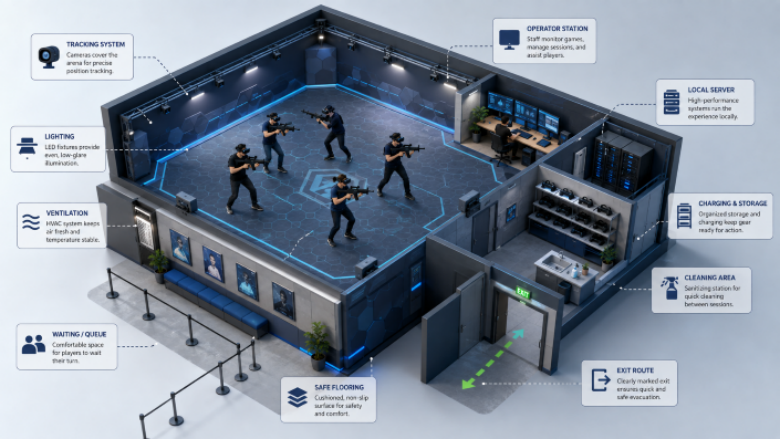
A VR arena is not separate from its room. Flooring affects safety. Lighting affects tracking. Ventilation affects comfort. Wall protection affects maintenance. Storage affects reset time. Sound control affects nearby tenants. If the room is treated as an afterthought, the equipment will carry blame for problems it did not create.
The arena should have a player zone, waiting area, equipment point, staff station, cleaning area, and exit route. These zones do not need to be huge, but they should be clear. A messy entrance can slow the whole business.
Props Need Special Attention
Props can improve immersion, especially in VR shooting arena or battlefield experiences. They can also slow the operation if they are heavy, fragile, hard to clean, or unreliable. A good prop feels natural to players and boring to staff. That is a compliment.
Equipment Checklist for Buyers
- Headsets: comfort, durability, hygiene accessories, battery plan, and replacement policy.
- Tracking: method, calibration process, room limits, and interference risks.
- Props: tracking stability, cleaning, storage, charging, and repair.
- Computing and network: synchronization, operator controls, and backup procedure.
- Room preparation: flooring, walls, lighting, ventilation, queue, and sound.
- Support tools: manuals, spare parts, daily checks, and staff training.
Content and Equipment Must Match
Equipment should be selected with content in mind. A VR shooting arena needs different props and pacing from a family adventure. A multiplayer battlefield mission may require stronger movement design. A compact arena may not need the same equipment as a large free roam VR venue.
This is where MiXR’s system approach helps. The buyer can discuss room size, target audience, player count, content direction, and equipment scope together. That prevents the common mistake of buying hardware first and forcing the attraction around it.
What to Ask Before Signing
Ask the supplier to explain the full equipment life cycle. How is it packed? How is it installed? How are headsets charged? What does staff check every morning? What happens when one device fails during business hours? How are content updates handled?
Ask for the daily checklist as well. A good checklist covers startup, tracking check, device battery, headset cleaning, prop inspection, content test, and shutdown. It sounds basic, but it keeps the attraction from depending on one experienced employee who happens to know the system.
The buyer should also review spare parts. Public venues are harder on equipment than controlled demos. Face interfaces, straps, batteries, controllers, prop parts, chargers, and small cables can create downtime if nobody planned replacements. Spare parts are not glamorous. They protect revenue.
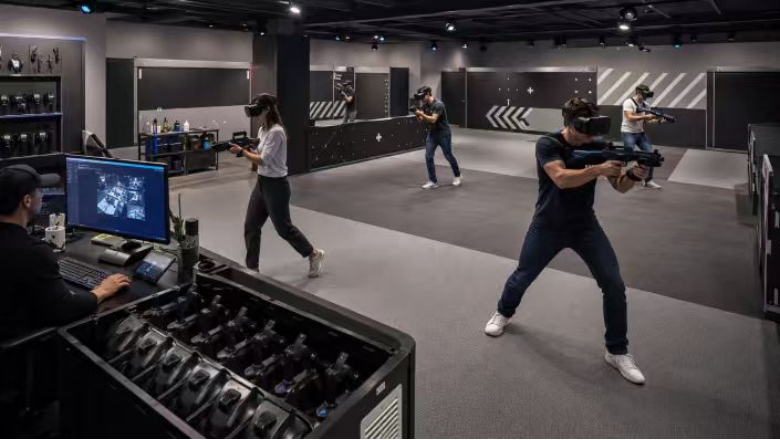
For entertainment centers, equipment layout should be tested with real staff movement. Can one employee carry cleaned headsets without crossing the player entrance? Can props be stored in a clear order? Can a new staff member see which devices are ready and which are charging? These details make the arena easier to run when the manager is not standing there.
Buyers should also ask whether the supplier can support future content. Equipment that works only with one game may limit the venue too quickly. A flexible arena does not need endless content, but it should have a reasonable path for new missions, difficulty levels, or event versions.
A serious VR Arena equipment guide is really a risk guide. It helps buyers see where the attraction can break down: tracking, reset time, poor room conditions, weak content, missing training, or unclear support. Once those risks are visible, the buying decision becomes much calmer.