VR Large Space Equipment Guide
A VR Large Space equipment guide should cover the full operating stack, not just headsets. The headset is visible, so it gets attention. But a commercial free roam VR attraction also depends on tracking, computing, network stability, room design, props, content, staff tools, sanitation flow, and maintenance habits. If one layer is weak, the visitor usually feels it.
For buyers planning a VR arena, free roam VR shooter, or multiplayer VR experience, MiXR’s VR Large Space solution can be used as a reference point: the product is an attraction system. The equipment package should help the venue open, operate, and refresh the experience, not leave the owner to connect unrelated devices after delivery.
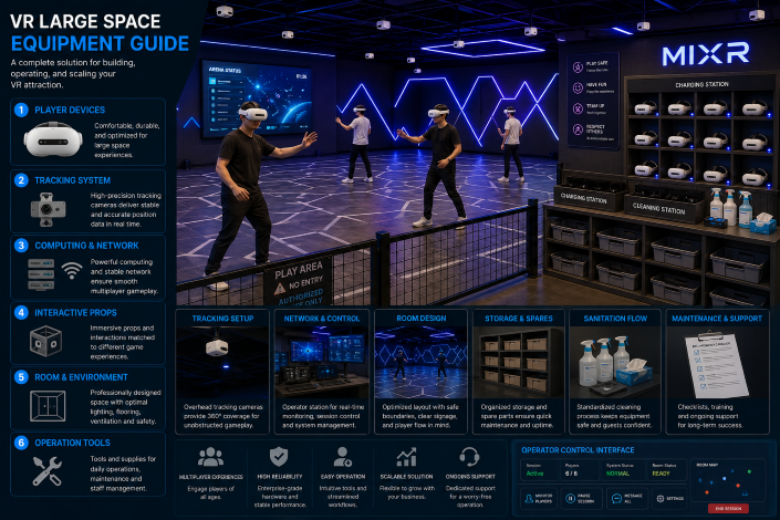
Core equipment layers
The first layer is the headset and player device. Depending on the system design, this may include standalone headsets, PC-connected headsets, backpack computing, controllers, trackers, weapon-shaped props, haptic accessories, or other interaction devices. The right choice depends on content style and room conditions.
The second layer is tracking. This is the part buyers should not treat casually. Tracking must keep player positions stable during normal play, with several people moving at once. Ask how the system handles occlusion, lighting changes, reflective surfaces, and calibration.
The third layer is control and networking. Multiplayer VR needs synchronization. Staff need an operator interface to start sessions, monitor players, pause if needed, and reset the room. Network layout, router placement, cable management, charging stations, and backup procedures all affect daily reliability.
The fourth layer is the room itself. Buyers sometimes treat walls, lighting, flooring, air flow, and storage as construction issues separate from equipment. In a VR Large Space attraction, they are part of the equipment environment. Bad lighting can disturb tracking. Bad air flow makes headsets uncomfortable. Bad storage slows reset.
Equipment buyers should specify
- Headsets and player devices: comfort, durability, field of view, battery or cable plan, and replacement policy.
- Tracking system: accuracy, calibration process, site requirements, and interference risks.
- Computing and network: servers, PCs, backpack units, wireless layout, and operator control station.
- Interactive props: controllers, weapon props, haptic devices, or simple hand tracking based on content.
- Room hardware: flooring, boundary protection, signage, lighting, ventilation, and staff visibility.
- Operation tools: charging racks, cleaning station, spare parts, maintenance checklist, and training materials.
Content is part of the equipment decision
Content decides how the hardware is used. A shooting arena needs different props and safety logic from an exploration game. A family mission needs easier onboarding than a competitive combat experience. A tourism project may need localized story elements. Buyers should choose equipment and content together, or they risk buying a system that does not fit the audience.
This is where an integrated supplier helps. MiXR can discuss the physical room, player count, content direction, and installation plan as one system. That is more practical than choosing a headset first and trying to force every later decision around it.
Do not underestimate hygiene and reset time
Headset cleaning, face covers, controller handling, battery swaps, and staff checks affect capacity. A session that is fun for players can still fail commercially if the reset takes too long. Plan the equipment storage and cleaning area before the venue opens, not after the first busy weekend.
What to ask before signing
Ask the supplier to provide a floor plan, equipment list, room requirements, player capacity, session cycle, content options, installation schedule, training plan, and maintenance guidance. Then ask what the venue team must prepare. Power, internet, air conditioning, safety exits, and local construction work may sit outside the supplier scope, but they still decide the launch quality.
A buyer should also ask for the daily checklist. Who charges devices? Who cleans face contact areas? Who checks straps and controllers? Who records a fault? Who decides whether a prop can stay in use after a minor impact? These questions sound small, but they keep the attraction from depending on one experienced employee.
A good VR Large Space equipment guide is really a risk guide. It tells the buyer where the attraction can break down: poor tracking, slow reset, weak content, unclear staff roles, hidden room limitations, or missing support. Once those risks are visible, the procurement decision becomes much calmer.
Who should buy this format
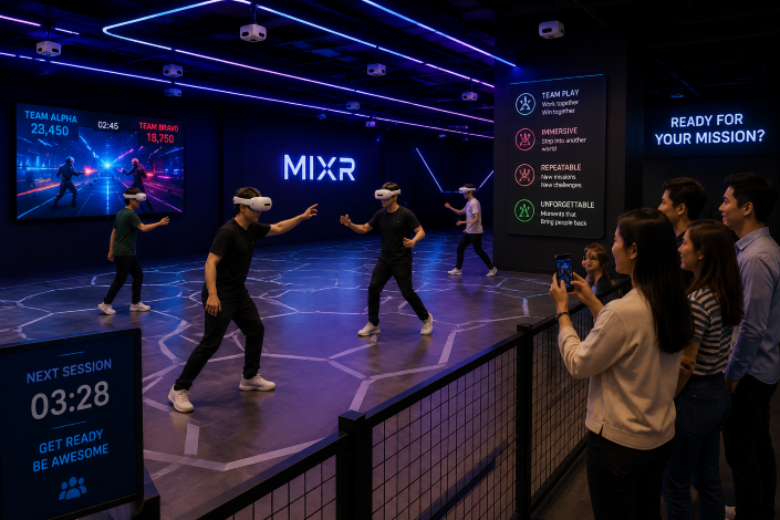
VR Large Space equipment makes sense for venues with enough group traffic, a clear entertainment brand, and staff who can manage repeated sessions. It is less suitable for a narrow shopfront with no waiting area or a location where visitors only pass quickly. The equipment can be strong and still be wrong for the site.
For a commercial venue that has the right space and audience, the format can become a flexible location-based VR attraction. The buyer should choose equipment that supports the full operating cycle, from first ticket to final headset cleaning. That is the difference between a room full of devices and a working entertainment business.