XR Theater Equipment Guide
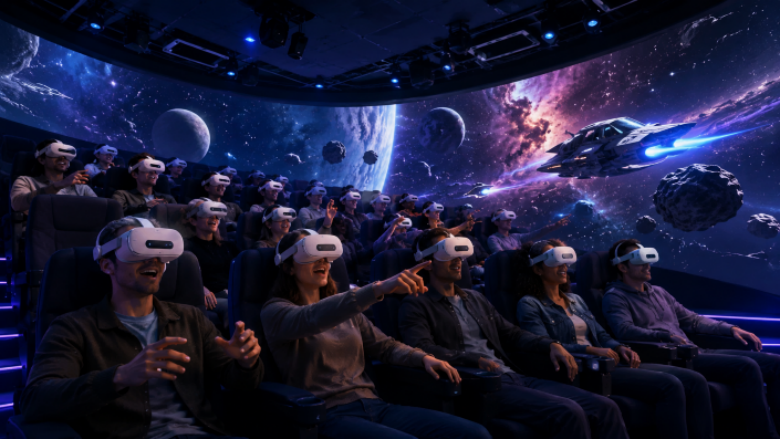
An XR Theater equipment guide should start with the show experience, not the equipment list. The buyer needs to know what the audience will do. Will visitors sit and watch? Wear XR headsets? Use gestures? Interact with virtual characters? Compete or cooperate as a group?
Once that is clear, the equipment plan becomes much easier to judge.
XR Theater is different from a simple projection room because it usually includes interactive digital layers. A product such as MiXR’s Hyper XR Theater may combine XR viewing, content playback, gesture interaction, spatial audio, seating or audience control, and synchronized effects.
Core Equipment Categories
Most XR Theater systems include several equipment groups.
XR Viewing System
This may include headsets, mixed reality devices, or other viewing systems depending on the design. The buyer should check comfort, hygiene, field of view, refresh rate, battery management, and replacement cost.
For commercial theaters, comfort matters. A device that feels acceptable for a short demo may become uncomfortable when hundreds of visitors use it each day.
Content and Playback System
The content system controls the show. It may include media servers, playback software, interactive software, synchronization tools, and content management. If the show includes branching scenes or gestures, the software must handle timing accurately.
The buyer should ask whether the content is fixed, customizable, or updateable.
Interaction System
Some XR Theater formats use gesture recognition, controllers, hand tracking, or other input methods. The interaction must be simple enough for first-time visitors. If staff need three minutes to explain one gesture, the design is too complicated.
Audio and Effects
Spatial audio, surround sound, wind, vibration, lighting, scent, or other effects may be used depending on the project. Effects should support the story. Too many effects can make the show feel noisy.
Seating, Layout, and Safety
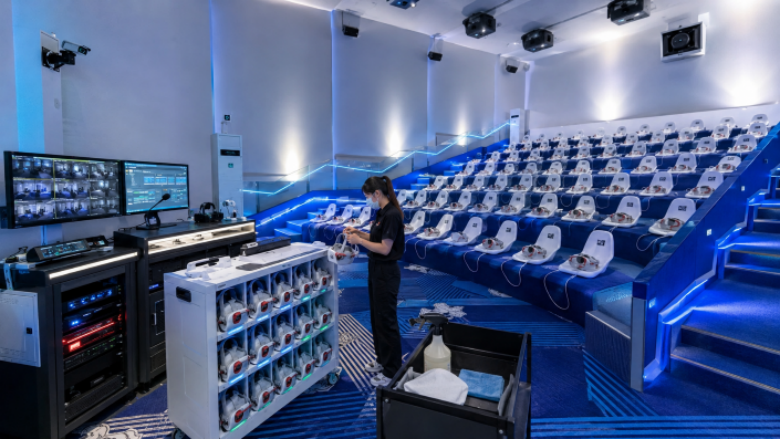
Theater layout affects capacity and comfort. Seat spacing, aisle access, emergency exits, equipment storage, cleaning flow, and staff visibility all matter. A beautiful render may hide poor operating flow.
What Buyers Should Ask Suppliers
Before buying XR Theater equipment, ask:
- What equipment is included in the base system?
- What is optional?
- How many visitors can be handled per session?
- What is the full operating cycle?
- How long does cleaning and reset take?
- Can the content be updated later?
- What spare parts should be stocked?
- What training is included?
- What site conditions are required?
- Who handles installation and calibration?
The answers should be specific. Vague words like “customizable” and “immersive” do not help procurement.
MiXR Hyper XR Theater as a Reference Format
MiXR’s Hyper XR Theater can be understood as an integrated XR theater solution rather than a single hardware device. For buyers, the important point is integration. Content, equipment, interaction, installation, and operation guidance need to work together.
If these parts are purchased from separate vendors, the project may still work, but coordination becomes harder. A turnkey approach can reduce that risk when the supplier has real installation experience.
Common Equipment Mistakes
Buyers often make three mistakes:
- Choosing devices before defining the show.
- Ignoring cleaning, storage, and reset time.
- Treating interaction as a feature rather than a visitor task.
Interaction should be obvious. Visitors should know what to do without feeling tested.
Equipment Should Serve the Story
XR Theater equipment is useful only when it supports a clear experience. A show about space travel, historical adventure, fantasy rescue, or science education may all need different hardware choices.
The right system is the one that fits the venue’s audience, staff, and content plan. If the equipment list looks impressive but the visitor role is unclear, the project is not ready.
Maintenance and Handover Requirements
XR Theater equipment should be easy for staff to inspect before opening each day. The supplier should explain startup checks, cleaning steps, calibration needs, battery management, and what to do if one device fails before a show.
For venues with high visitor flow, spare parts are not optional. Replacement straps, hygiene accessories, charging equipment, cables, sensors, and backup devices can protect uptime. The buyer should ask which parts usually wear first and how quickly they can be replaced.
Good handover also includes documentation. Staff should not depend on memory alone. A clear operating manual, troubleshooting guide, and training plan make the theater easier to run after the supplier leaves the site.
Buyers should also check whether the equipment plan supports future content. If the theater may add new shows later, the system should not be locked to one narrow format. Flexible playback, clear content management, and enough processing capacity can save money when the venue wants to refresh the attraction.
This is especially important for cultural tourism and theme park venues. The first show may be built for launch, but the venue may later need a holiday version, a new language version, or a shorter group-tour version. Equipment decisions made at the beginning can either make those updates easy or make them expensive.